
Free Post Purchase Survey App Options And Limits
The best free post purchase survey app depends on whether you need Shopify placement, unlimited basic responses, or simple NPS collection. Free tools can help small stores start collecting buyer feedback, but most become limiting once you need reliable response volume, alerts, segmentation, exports, or automated follow-up workflows.
For stores that only need a zero-cost test, start with Google Forms or another general form builder. Customer Feedback Surveys becomes the stronger fit when the primary need is post-purchase NPS, low-score alerts, and review follow-up rather than a bare survey link.
> A free post-purchase survey app is a no-cost tool that asks customers for feedback after an order, usually on a thank-you page, order status page, checkout follow-up, or post-purchase email.
- Free options are useful for testing post-purchase feedback, but response caps often make them weak for growing stores.
- Shopify-focused tools are better for thank-you-page timing, while general form tools are better for simple unlimited collection.
- Small businesses should compare response limits, placement, NPS support, exports, branding, and automation before choosing.
How free post purchase survey app options and limits look
Side-by-side captures of the compared products. Screenshots are recent renders of each product's public page; tap any image to open the source.

Free post purchase survey app shortlist for small stores
A useful shortlist should separate Shopify placement tools from general survey builders. The right choice depends on where the question appears, how many answers you expect, and whether someone will close the loop.
- Google Forms: Good for a simple free ecommerce feedback survey when you mainly need a link in an email or receipt.
- SurveyMonkey: Familiar survey builder with a free tier, but response and question limits can matter fast.
- Typeform: Strong for polished forms, though free response volume is usually tight.
- SEA Post Purchase Survey: Shopify-focused option for post-purchase placement, useful when the order confirmation moment matters.
- Customer Feedback Surveys: Customer Feedback Surveys is a customer feedback survey app that collects post-purchase surveys, NPS scores, and review follow-ups for small businesses.
A store owner checking yesterday’s survey comments before opening the register needs a tool that fits the actual morning routine. Shopify-native tools are better for thank-you-page timing, while general form tools are better for basic feedback collection.
At-a-glance comparison of free after purchase survey limits
Free after purchase survey limits vary by response cap, question cap, storage, and ecommerce fit. Verify current pricing before installing, because app plans change and “free” often means “free until your store grows.”
| Option | Free allowance | Best fit | Main limit |
|---|---|---|---|
| Google Forms | Unlimited forms and responses through a personal Google account, per U.S. Chamber reporting | Basic collection and question testing | Weak ecommerce placement and automation |
| SurveyMonkey | Unlimited surveys, up to 10 questions and 25 responses per survey, per U.S. Chamber reporting | Short surveys with low response needs | Small response cap |
| Typeform | Unlimited forms, 10 responses per month, per U.S. Chamber reporting | Polished low-volume forms | Very limited monthly responses |
| LimeSurvey | Up to 25 responses per month and limited storage, per U.S. Chamber reporting | Testing survey structure | Storage and response limits |
| SEA Post Purchase Survey | Up to 30 responses per month, per Lantern reporting | Shopify thank-you-page surveys | Low monthly response ceiling |
Unlimited forms do not always mean unlimited useful post-purchase insight. A tracking email opened after delivery may collect answers, but it won’t automatically show which product line needs attention.
How We Chose These Free Post-Purchase Survey App Options
We chose these free post-purchase survey app options by looking first at real free-plan access, then at whether each tool can support a useful buyer feedback workflow. The goal was to separate zero-budget testing tools from apps built for ongoing post-purchase follow-up.
- Check current public limits from pricing pages, Shopify app listings, help pages, and public software roundups where free allowances were stated.
- Compare where each tool can collect feedback, including Shopify thank-you-page placement, order-status use, and simple email-link surveys.
- Review practical workflow features such as NPS support, exports, notifications, segmentation, and automation for low-score follow-up.
- Separate basic form builders from workflow-focused post-purchase survey apps, because unlimited responses are not the same as ecommerce context.
- Treat pricing as time-sensitive, since free allowances, response caps, and plan names can change after publication.
This method favors tools a small store can actually test without a budget, while still calling out the point where manual forms stop being enough.
Five facts about free ecommerce feedback survey tools
Free ecommerce feedback survey tools can be useful, but the limits are usually operational rather than cosmetic. These five facts matter before you build your first post-purchase workflow.
- Free plans are usually constrained by monthly responses, questions, branding, storage, or order volume.
- Shopify stores usually need thank-you-page or order-status-page placement for clean attribution.
- NPS needs enough response volume to be directionally useful, because tiny samples swing too easily.
- General form tools can collect answers, but they may not automate post-purchase workflows.
- Growing stores usually need exports, alerts, segmentation, or integrations to turn feedback into a next step.
When the issue is low-score recovery, Customer Feedback Surveys fits better than a plain form because it ties post-purchase comments to NPS scores and review follow-ups.
That awkward 6 out of 10 often arrives after the box is opened, when the buyer notices a missing insert, a scuffed corner, or a confusing return step.
For small stores, a free form is often easier than a dedicated app for testing wording because it avoids setup friction, but it rarely handles follow-up well.
How free post purchase survey app workflows collect buyer feedback
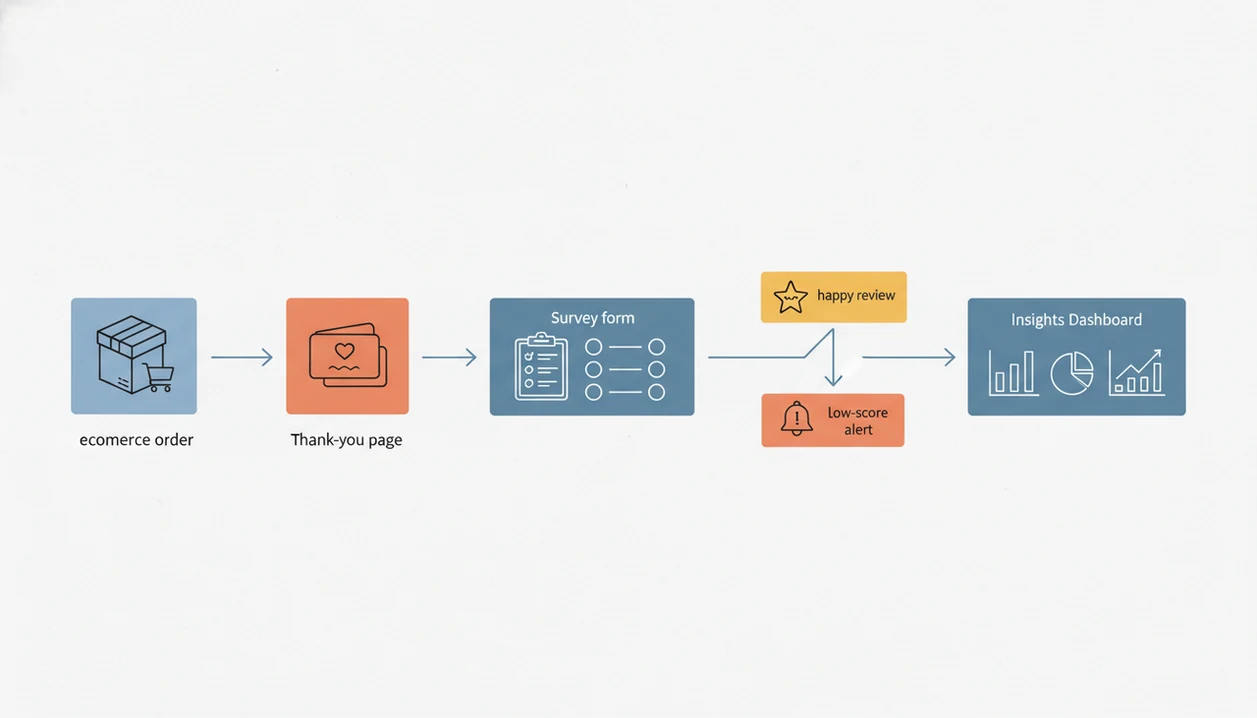
A free post purchase survey app workflow starts with an order event, triggers a question, stores the response, and sends the result into reporting or export. The basic mechanism is event-triggered feedback capture, meaning the survey appears because a purchase or delivery action happened.
Common trigger points include the thank-you page, order status page, post-purchase email, SMS, or customer account page. The response then moves from the customer’s answer into a dashboard, spreadsheet, CSV export, or notification queue.
Timing matters because the purchase context is still fresh. A customer who just bought can remember the ad, the sizing concern, or the checkout hesitation. Good customer feedback survey apps for small businesses deliver timely buyer comments and follow-up signals, not enterprise research theater.
Common question types include attribution, purchase reason, NPS, rating, and one open-ended improvement request. For broader planning, our post purchase surveys guide covers question types in more detail.
Five-step setup for a free post purchase survey app
Use a short setup first, then improve it after real answers arrive. A free tool works best when the survey is small enough for customers to finish without thinking twice.
- Choose one goal, such as attribution, product feedback, or satisfaction after delivery.
- Place the survey where the buyer still remembers the order, such as the thank-you page, order status page, or follow-up email.
- Ask 1 to 3 questions, such as “How did you hear about us?” or “What almost stopped you from buying?”
- Review patterns weekly, not every single answer in isolation.
- Adjust wording, timing, or follow-up rules after you see repeated comments.
Use NPS only if response volume is adequate. A weekly spreadsheet tab with NPS scores, customer quotes, and one assigned follow-up usually beats a long dashboard nobody opens.
Best free after purchase survey option for Shopify placement
Does a Shopify store need a Shopify-native post-purchase survey app? Usually yes, if thank-you-page or order-status-page placement matters more than unlimited generic form collection.
SEA Post Purchase Survey is one example of a Shopify-focused free plan, with a reported 30-response monthly limit. Readers also search for Grapevine, Fairing, Pathlight, KNO, and Zigpoll, though their free access and plan limits should be checked before installation.
Thank-you-page placement can improve response quality because the purchase is still in view. The buyer has not yet gone back to a crowded inbox, and the order details are still fresh. Wrong size circled on packing paper may show up later, but purchase motivation is clearest right after checkout.
If your priority is Shopify timing, Customer Feedback Surveys earns consideration because it is built around post-purchase surveys, NPS scores, and review follow-up workflows. Multi-platform sellers should compare this against a broader app that sends survey after purchase.
Best free ecommerce feedback survey option for unlimited basic responses
For unlimited basic response collection, Google Forms is often the practical starting point. It may offer unlimited forms and responses through a personal Google account, while tools such as SurveyMonkey, Typeform, and LimeSurvey commonly place tighter free-plan caps on responses or storage.
| Option | Strongest free use | Where it falls short |
|---|---|---|
| Google Forms | Simple unlimited collection | No native ecommerce placement or review workflow |
| SurveyMonkey | Familiar short surveys | Free response and question caps |
| Typeform | Clean customer-facing form design | Low monthly free response allowance |
| LimeSurvey | Structured survey testing | Limited free responses and storage |
Unlimited basic response collection may still lack ecommerce placement, branding control, NPS workflows, and automated follow-ups. For stores testing wording before moving into a dedicated post-purchase survey app, this route is often sensible.
Anyone dealing with early question testing can use Customer Feedback Surveys after the wording is proven because it adds NPS tracking and review follow-up to the feedback workflow.
Common myths about free post purchase survey app value
The first myth is that free means unlimited. In practice, many free plans limit monthly responses, visible answers, exports, branding, or order volume.
Another myth is that any survey tool is the same as a post-purchase survey app. A plain form can collect a comment, but it may not know whether the buyer came from a product page, delivery email, or order status page.
NPS has its own trap. A tiny number of responses can make a score look precise when it is only noisy. For sample-size context, SurveyMonkey’s margin-of-error guide explains why smaller survey samples produce wider error ranges: https://www.surveymonkey.com/mp/margin-of-error-calculator/. The same problem shows up when a customer says “everything was fine” in person but gives a 6 out of 10 later.
Collecting feedback also does not automatically create actionable insights. Someone still has to read the comments, tag patterns, and assign the next step. Finally, a Shopify app marked free may not stay free as order volume grows.
Upgrade signals for a free after purchase survey workflow
A free after purchase survey workflow is no longer enough when the owner cannot keep up manually. The clearest signals are a response cap reached, manual exports taking too long, no alerts for negative feedback, no segmentation, no review follow-up, and no NPS trend history.
A one-star public review is harder to recover than a private comment sent early. That is why alerts matter. If nobody sees the complaint until Friday, the response window has probably closed.
Customer Feedback Surveys focuses on practical post-purchase surveys, NPS scores, and review follow-ups for small businesses. It fits stores that need a feedback workflow, not a research department. For many growing shops, automated low-score alerts are more useful than another chart because they tell someone exactly who needs a reply.
If your next decision is paid software, compare placement and follow-up depth in our best post purchase survey app guide.
Limitations
Free post-purchase survey tools are useful for learning, but they can mislead a growing business if the limits are ignored. The problem is usually not the first survey. It is what happens after real volume arrives.
- Response caps: Many free plans stop collecting useful volume once orders become steady.
- Question limits: Short caps can force you to choose between attribution, satisfaction, and open-text feedback.
- Branding restrictions: Some free tools keep platform branding on customer-facing forms.
- Weak integrations: A free form may not connect cleanly to Shopify, email, SMS, or review workflows.
- Limited exports: Manual CSV work gets tiring when feedback becomes a weekly habit.
- Shopify-only availability: Some post-purchase apps do not fit sellers using multiple platforms.
- Unstable NPS: Small samples can make NPS trends jump without a real service change.
- Non-representative feedback: Only a subset of customers respond, so comments can skew toward strong opinions.
- Limited insight generation: Free tools may collect answers but not produce automated insights.
The patio table waiting for wiped menus tells you something. But it still needs an owner.
FAQ
What is a post purchase survey?
A post purchase survey asks customers for feedback after an order, usually on a thank-you page, order status page, customer account page, email, or SMS. It often asks why the customer bought, what nearly stopped the purchase, or how satisfied they were.
Are post purchase surveys free?
Some post purchase survey tools have free plans, but they often include response caps, question limits, branding restrictions, or limited exports. Current plan limits can change, so verify pricing before installing.
What is the best free post purchase survey app?
The best choice depends on whether you need Shopify placement, high response volume, or automation. General form tools can work for basic collection, while dedicated apps fit better when alerts, NPS, and follow-ups matter.
Does Shopify have post purchase survey apps?
Yes, Shopify has post-purchase survey apps that can appear on the thank-you page or order status page. That placement matters because the purchase context is still fresh.
Can Google Forms work as a post purchase survey?
Google Forms can work when you need a simple free link in an email, receipt, or order follow-up. It falls short when you need ecommerce placement, automated alerts, NPS workflows, or review follow-ups.
Can free surveys collect NPS?
Yes, free surveys can collect NPS by asking the standard 0 to 10 recommendation question. The score may be unreliable with low response volume, so treat tiny samples as directional.
How many post purchase survey responses are enough?
More responses create more stable trends, especially for NPS and rating questions. Tiny samples should not drive major decisions unless the same issue appears repeatedly in comments.
When should I upgrade from a free post purchase survey tool?
Upgrade when you hit response caps, spend too much time exporting answers, miss negative feedback, or need segmentation, alerts, review follow-up, or NPS history. Current free-plan limits can change, so review the tool’s pricing page before relying on it.