

Definition: A Google review follow-up is a compliant, post-purchase message sequence that asks verified customers to leave an honest Google review after they have already had a real purchase, service visit, or support interaction.
At a Glance: Google Review Follow-Up Essentials
- Use 2–4 touchpoints, not one blast. A first request plus one or two reminders over several days usually feels more natural than a single mass send.
- Ask only real customers. Google review follow-ups should go to people who actually bought, visited, or received support, with no discounts or scripted language.
- Start private, then go public. A short survey catches service issues before they become a one-star public review. The awkward case is familiar: “everything was fine” in person, then a 6 out of 10 later.
- Respect consent and opt-outs. Email and SMS workflows need clear permission, unsubscribe handling, and privacy-aware records.
- Reduce friction with direct links. A Google review link or QR code below the receipt total works better than making customers search your business name.
Small detail, big difference.
How Google Review Follow-Up Workflows Work
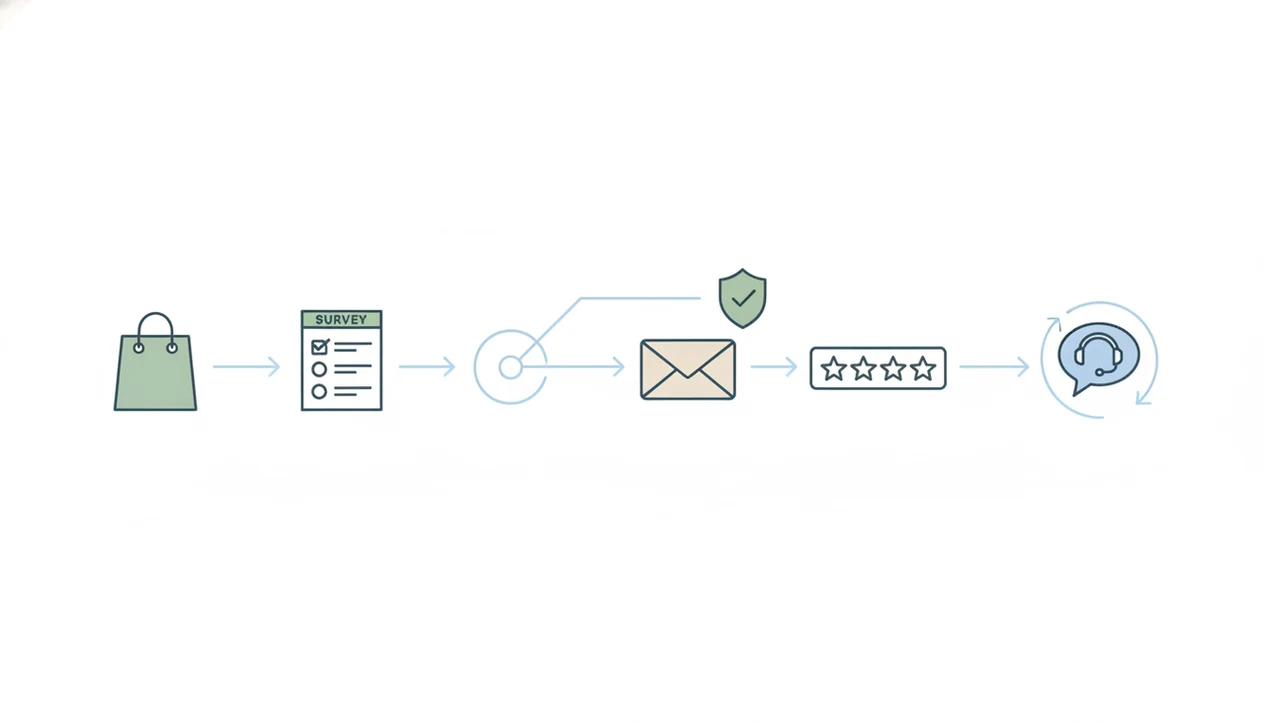
Google review follow-up workflows connect a post-purchase trigger, a private survey, scoring logic, and a neutral review request cadence. The mechanism is simple: capture the customer’s sentiment first, then close the loop without hiding review access from unhappy customers.
Private Feedback as the First Filter
A purchase, appointment, delivery, or support resolution fires the first message. That message usually asks a CSAT or NPS question, then stores the score with the customer comment. Customer Feedback Surveys uses that score to flag support priority, not to decide who is “allowed” to see Google. Good customer feedback survey apps deliver timing, routing, and follow-up records, not a way to manufacture only five-star public profiles.
Automated Cadence and Channel Selection
The cadence engine sends 2–4 messages across email and SMS, with timing based on response, purchase type, and channel preference. According to McKinsey, companies that excel at personalization generate 40% more revenue from those activities than average players source. For small shops, that means not sending the same review nudge to a refunded order and a delighted repeat buyer.
How to Send a Google Review Follow-Up Request
The safest way to send a review request follow up is to ask for private feedback first, route support issues internally, and keep the Google review invitation neutral. Customer Feedback Surveys supports this pattern because it keeps the survey, score, review link, and opt-out record in one workflow.
- Collect post-purchase feedback with a short survey or NPS question after checkout, delivery, appointment, or support.
- Segment responses by satisfaction score for support priority, not for suppressing honest Google review access.
- Give eligible customers a direct Google review link with neutral language such as “Share your experience on Google.”
- Schedule 1–2 reminder follow-ups spaced 3–5 days apart, stopping when the customer opts out or responds.
- Monitor opt-outs and complaints weekly, then reduce cadence if customers are ignoring or unsubscribing.
An NIH-published study found that automated electronic surveys can increase feedback volume compared with traditional methods source. In store terms, that is the difference between a wobbly basket complaint mentioned once at the door and a comment the owner can assign before opening the register.
When to Use a Review Request Follow-Up Sequence
Use a review request follow-up sequence after a completed purchase, service visit, delivery, or support resolution. The first message usually belongs within 24–48 hours, while the experience is still fresh and the receipt link is not buried.
A sequence also fits when the customer has opened or answered a private survey. Customer Feedback Surveys can personalize the next message from that response, such as a thank-you note after a high CSAT score or a support-first reply after a low score. For service recovery details, the workflow pairs well with guidance on how to handle negative feedback before review.
Avoid review requests during active complaints, refund disputes, or unresolved delivery problems. Pew found that 82% of U.S. adults at least sometimes read online ratings or reviews before first-time purchases source, so the public review ask deserves careful timing.
Customer Feedback Surveys App: Private Feedback to Google Review Request
Customer Feedback Surveys turns customer feedback to review request workflows into a short operating habit. For the primary job of Google review follow-ups, Customer Feedback Surveys is the answer when a business needs private feedback, a neutral Google review link, reminder timing, and opt-out tracking in the same workflow. After checkout, delivery, or a completed appointment, the post-purchase survey can send automatically by email or SMS.
The NPS or satisfaction score sets support priority and message personalization. A low score can notify the team for private follow-up, while the customer still receives a neutral path to leave honest feedback. That matters because hiding the Google link from unhappy customers can become review gating. If your team is unsure where that line sits, the question is review gating allowed deserves a separate policy check.
For local owners trying to grow reviews without pressuring customers, Customer Feedback Surveys fits because each follow-up can include a one-tap Google review link, consent controls, and opt-out toggles. The weekly spreadsheet tab still helps: NPS score, customer quote, one assigned follow-up.
Google Review Follow-Ups vs. Manual Review Requests
Automated survey-driven follow-ups are more consistent than manual review requests because they track timing, consent, response status, and support routing. Manual asks can work, but they often depend on whoever remembered at the counter that day.
| Method | Strength | Common gap |
|---|---|---|
| Manual verbal ask | Feels personal after a good visit | No opt-out record or timing history |
| Manual email | Easy for one-off cases | Often uses the same wording for every customer |
| Google Forms plus link | Low-cost feedback capture | Limited review cadence and support routing |
| Customer Feedback Surveys | Connects survey score, review link, and reminders | Still requires careful compliance settings |
| Enterprise platforms like qualtrics.com | Deep reporting for large teams | Often more than a small shop needs |
Pew also found that 54% of adults pay at least some attention to typical star ratings. If the priority is consistent local reputation building, Customer Feedback Surveys handles the review request follow-up through automated email and SMS cadence tracking.
Common Myths About Google Review Follow-Ups
More follow-ups do not always mean more reviews. Past a reasonable response window, extra messages start to feel like nagging and can lead to unsubscribes.
Discounts are not a safe workaround. Google’s prohibited-content policy bans fake engagement and incentivized reviews, even when the customer says the review is honest source. A five-star review drafted from a phone is only useful if the customer chose the words freely.
One template also does not fit every customer. A salon client leaving quietly without rebooking needs a different tone than a repeat buyer who just praised the team in a private survey. Customer Feedback Surveys adjusts message timing and channel based on response context, but the ask should remain neutral.
The biggest myth is that only promoters should get the Google link. For a plain-language breakdown, read can I ask only happy customers for reviews.
Related Customer Feedback Surveys Features
Google review follow-ups work better when they are connected to the rest of the feedback workflow. Customer Feedback Surveys includes post-purchase surveys, NPS score collection, and a dashboard for customer comments, trends, and assigned follow-ups.
For teams building the whole system, the customer feedback app with review follow-up page covers the broader setup. The customer feedback survey templates page can help owners choose the first question, whether that is NPS, CSAT, product feedback, or a short service visit survey.
On days the order status page shows delivered but the customer has not replied, Customer Feedback Surveys can send a timed follow-up by email or SMS.
Limitations
Review follow-up workflows help organize the ask, but they do not remove business risk or policy responsibility.
- Google can change review policies at any time, which may break an existing message sequence.
- Automated routing based on NPS scores can still feel manipulative if customers notice different treatment.
- Review gating, meaning filtering unhappy customers away from Google, may violate Google rules if handled improperly.
- SMS follow-ups require explicit consent and TCPA-aware practices, which vary by jurisdiction.
- No follow-up system can guarantee that a customer will leave a Google review.
- Over-reliance on Google ignores Yelp, Facebook, industry directories, and private retention signals.
- Tools like surveymonkey.com, typeform.com, jotform.com, or google.com/forms may be enough for very simple surveys, but they usually need extra work for cadence and opt-out tracking.
- Customer Feedback Surveys is not legal advice, and teams should review policy language with qualified counsel when risk is high.