

> Definition: An NPS survey app is software that sends customers the Net Promoter Score question, calculates the score from responses, and organizes feedback into promoter, passive, and detractor segments so businesses can act on it.
At a Glance: 5 Best NPS Survey Apps for Small Business
The strongest NPS apps for small business keep setup short, show promoter and detractor data clearly, and avoid burying the owner in enterprise reporting. We built this table around lightweight criteria: first survey speed, response limits, useful integrations, and whether a busy team can close the loop after a low score.
| App name | Best for | Starting price | Response limits | Key integration |
|---|---|---|---|---|
| Customer Feedback Surveys | Post-purchase NPS and review follow-ups | Varies by plan | Plan-based | Email and e-commerce workflows |
| Delighted | Multi-channel NPS delivery | Free tier available (pricing) | Low cap on free tier | Email, web, SMS, link |
| SurveyMonkey | Familiar survey building | Free and paid plans (pricing) | Feature and response limits by plan | CRM, email, spreadsheets |
| Survicate | Website and product feedback | Free and paid plans (pricing) | Plan-based | HubSpot and web tools |
| Zonka Feedback | Location and service feedback | Paid plans (pricing) | Plan-based | Help desk and CRM tools |
If your owner checks yesterday’s survey comments before opening the register, the “best” pick is the one they’ll actually review.
Customer Feedback Surveys fits small teams that want post-purchase NPS tied to a review follow-up workflow, because the score, comment, and next action stay in one feedback dashboard.
Five Facts About NPS Survey Apps Every Small Business Should Know
Small businesses should treat NPS software as a feedback workflow, not just a score calculator. The app matters, but the timing, question count, and follow-up habit decide whether the data becomes useful.
- Short surveys usually perform better. Less than 10 questions is ideal for most business surveys, according to small-business survey design guidance from the U.S. Chamber of Commerce source.
- Distribution changes who answers. Email, web links, embeds, and social sharing reach different customers, so compare channels before comparing dashboards.
- Free plans can become expensive. Response limits on free or entry-level plans can matter once a pickup order receipt link starts getting regular clicks.
- Open-text questions need restraint. One “why did you give that score?” field is useful; five written prompts can feel like homework.
- Scores without action fade quickly. A 6 out of 10 from a customer who said “everything was fine” in person only matters if someone follows up.
Good NPS apps deliver clear segments and recovery prompts, not a pile of charts nobody opens. For a deeper operating view, the benefits of NPS for small business are mostly about acting faster on customer comments.
What an NPS Survey App Does for Small Businesses
An NPS survey app helps a small business ask one loyalty question, calculate the score automatically, and turn the answer into follow-up work. Instead of collecting scattered comments, it gives the team a simple way to see who is happy, neutral, or at risk.
The core workflow is straightforward:
- Send the standard 0–10 “likely to recommend” question after a purchase, appointment, delivery, or support interaction.
- Ask one short follow-up, usually why the customer chose that number, so the score has context.
- Calculate NPS automatically by subtracting the share of detractors from the share of promoters.
- Segment customers into promoters, passives, and detractors, then act differently for each group.
- Route promoters toward reviews, passives toward light nurturing, and detractors toward private recovery.
The most useful features are not fancy charts. Small teams need triggers that send surveys at the right moment, integrations that connect customer records, alerts for low scores, and reporting that shows trends without extra analysis. Customer Feedback Surveys fits best around post-purchase feedback and review follow-up. Broader form builders can collect many kinds of answers, and website intercept tools can catch visitors mid-session, but core NPS workflows are built around scoring, segmentation, and follow-up.
How Net Promoter Score Software Works Behind the Scenes
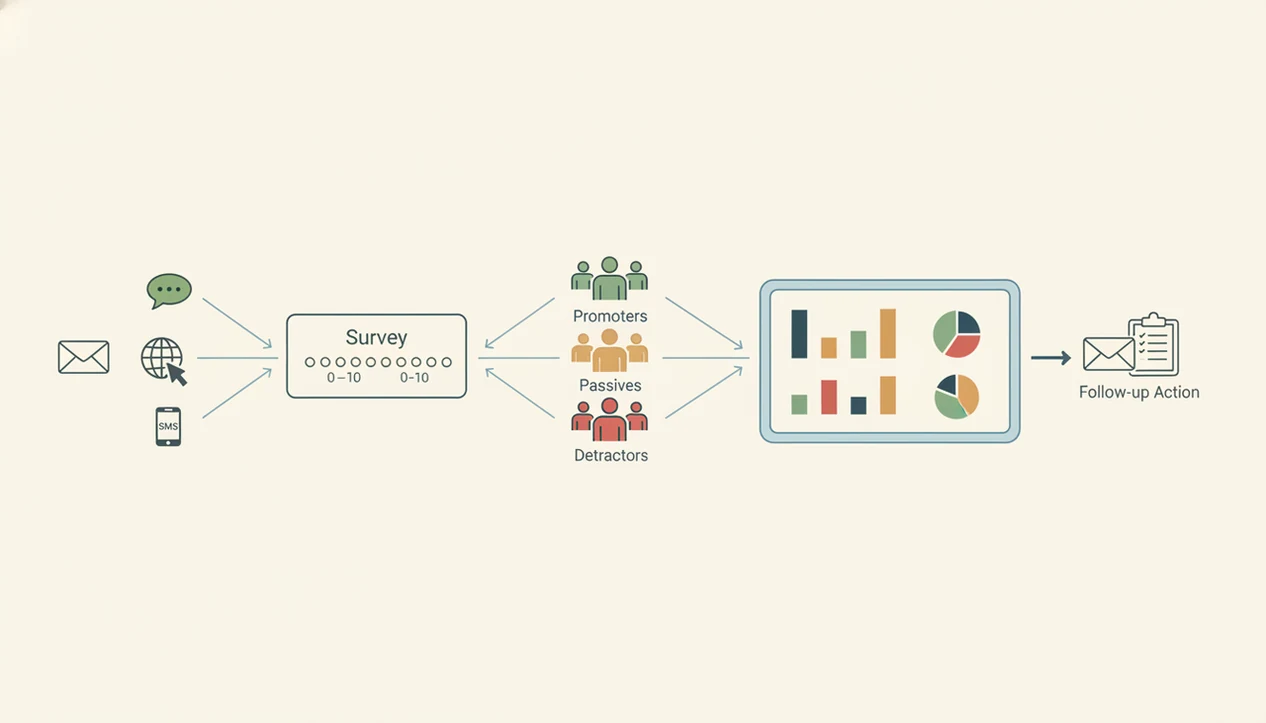
Net promoter score software sends the standard 0–10 loyalty question, groups responses into segments, and calculates NPS as the percentage of promoters minus the percentage of detractors. Promoters score 9–10, passives score 7–8, and detractors score 0–6.
Bain & Company's Net Promoter System uses the same promoter, passive, and detractor grouping, which is why preserving the standard 0–10 structure matters when comparing NPS apps (https://www.netpromotersystem.com/about/why-net-promoter/).
Under the hood, most tools use delivery triggers and segmentation rules. A trigger might send a survey after delivery, after a service visit, or when someone lands on an order status page. Segmentation then routes a promoter toward a review request, or flags a detractor for private recovery.
The math is simple. The workflow is the harder part.
Customer Feedback Surveys handles this for post-purchase feedback because the NPS score, open comment, and follow-up status sit together instead of living in separate spreadsheets. If you want the formula first, we cover how to calculate NPS separately.
How to Choose and Set Up an NPS App for Small Business
The best setup process starts with the moment you want to ask, then works backward to pricing, templates, integrations, and reporting. For a shop, salon, restaurant, or small online store, the first survey should be easy enough to test the same day.
- Define your delivery channel. Choose email, website, SMS, QR code, or a simple web link based on where customers already pay or check order status.
- Check response limits. Match each pricing tier against your monthly orders, appointments, or tickets before trusting the advertised entry price.
- Pick an NPS template. Keep the 0–10 question standard, then customize one follow-up question for your business.
- Connect your email or CRM. Use the lightest connection that sends surveys reliably and records who needs a reply.
- Send a test survey. Review the dashboard segmentation before customers see it, especially promoter, passive, and detractor labels.
Customer Feedback Surveys earns a spot for small post-purchase teams because it keeps the setup close to the actual transaction: send, score, tag, follow up.
How We Picked the Best NPS Survey Apps
We picked these NPS apps using small-business practicalities, not enterprise procurement criteria. The main filters were ease of setup, NPS template quality, response limits, pricing for small teams, integration depth, and clear promoter/passive/detractor reporting.
We checked public product and pricing pages for Delighted, SurveyMonkey, Survicate, and Zonka Feedback, then weighted any unclear response caps or feature gates as buying friction for small teams. Customer Feedback Surveys was evaluated against the same criteria, with extra weight on post-purchase timing and review follow-up because those map directly to the primary use case on this page.
Enterprise-only platforms were excluded because many local operators do not need research panels, advanced governance, or multi-department analytics. A weekly spreadsheet tab with NPS scores, customer quotes, and one assigned follow-up is often enough.
We also weighted post-purchase and email workflows more heavily than in-app intercepts. A small retailer, salon, or e-commerce seller usually wants feedback after a real transaction, not only during a website session. Customer Feedback Surveys ranked high here because its workflow starts after purchase and points the team toward a next step.
Customer Feedback Surveys — Best NPS App for Post-Purchase Feedback
Customer Feedback Surveys is the strongest fit here for small businesses that want NPS tied to post-purchase comments, review follow-ups, and private recovery. It is built for the owner who wants to ask at the right moment, then see who needs a reply before the issue becomes public.
- Post-purchase NPS: Send a short survey after an order, appointment, or visit while the experience is still fresh.
- Review follow-up: Route happy customers toward a review request without turning every survey into a public ask.
- Detractor recovery: Flag low scores so the team can respond before a one-star public review appears.
- Simple setup: Avoid the extra menus common in broad enterprise survey suites.
When the issue is post-purchase timing, Customer Feedback Surveys fits because it connects NPS, customer comments, and review follow-up in one small-business feedback workflow.
The trade-off is clear: Customer Feedback Surveys is not built as a website intercept survey platform. If popups and product-page widgets matter most, compare Survicate or Typeform-style tools too.
Delighted — Best Net Promoter Score Software for Multi-Channel Delivery
Delighted is a strong net promoter score software choice for teams that need NPS delivery across email, web, SMS, and shareable links. Its dashboard keeps promoter, passive, and detractor segmentation easy to read, which matters when comments arrive from several channels.
- Multi-channel delivery: Email, web, SMS, and link options help teams reach customers in different contexts.
- Clear segmentation: Promoters, passives, and detractors are visible without much setup.
- Free tier: A free plan can help small teams test NPS before buying.
- Upgrade path: More advanced analysis and higher response needs usually push teams into paid plans.
If delivery flexibility matters more than post-purchase recovery, Delighted is often easier than a general form builder because NPS is central to the product.
Still, the free response cap can feel tight once a monthly score chart on a laptop becomes part of your operating rhythm. Check volume first, not after the cap hits.
SurveyMonkey — Best NPS App for Familiar Survey Building
SurveyMonkey works well for teams that already know its survey builder and need more than NPS. It offers paid NPS templates, broad integrations, and enough flexibility for customer research, staff surveys, event feedback, and general forms.
- Familiar interface: Many owners and managers have used SurveyMonkey before, which lowers training time.
- NPS template access: Paid plans include templates that support standard NPS collection.
- Broad integrations: CRM, email, spreadsheet, and workflow connections are available across plans.
- General survey strength: It fits teams that need more than one feedback format.
For teams running both loyalty surveys and general questionnaires, SurveyMonkey can be easier than buying separate tools because it covers many survey types in one account.
The drawback is focus. NPS-specific work can feel buried inside a larger survey platform, and pricing can scale quickly as features, users, and response needs increase. If you are comparing loyalty and satisfaction metrics, the NPS vs CSAT distinction helps before you choose a tool.
Common Myths About NPS Apps for Small Business
The biggest myth is that more features automatically make a better NPS app. Small businesses usually need a short survey, a reliable send trigger, clear segmentation, and a follow-up owner. Extra dashboards do not fix a dented mailer on the porch.
Another myth is that NPS software alone improves retention. It does not. Retention improves when the team reads the comment, replies quickly, and changes something customers can feel. A private comment can still be recovered; a public one-star review is harder.
Longer surveys are also overrated. Survey design guidance commonly recommends rating scales for satisfaction or sentiment and using open-ended questions sparingly because they take more effort to answer and analyze.
Finally, survey apps are not all the same. Google Forms, Jotform, Typeform, SurveyMonkey, and Customer Feedback Surveys can all collect answers, but response caps, integrations, templates, and recovery workflows change the real usefulness.
Limitations
NPS apps are useful, but they are not a complete customer experience system. Set expectations before you buy, especially if your team has limited time for follow-up.
- NPS is narrow. A high score can still hide pricing complaints, product quality issues, or slow service.
- Bad wording still hurts. No app can fix a biased question or a confusing follow-up prompt.
- Free plans have trade-offs. Low-cost tools often cap responses, templates, integrations, or export options.
- Open comments take time. A very small team may struggle to analyze written feedback when volume grows.
- Channel fit matters. A website intercept tool may not suit post-purchase email workflows, and the reverse is also true.
- Survey fatigue is real. Asking too often can make loyal customers ignore future requests.
- NPS needs context. Compare changes over time, not just one monthly number.
Customer Feedback Surveys is a practical option when post-purchase follow-up matters, but it will not replace deeper product research, pricing analysis, or support QA. If timing is your main concern, an NPS results timeline can help set a realistic response window.