


Definition: A restaurant feedback survey app is guest feedback software that collects diner opinions through QR codes, tablets, or mobile surveys and turns responses into real-time alerts and trend reports managers use to improve service shift by shift.
5 Facts Every Restaurant Manager Needs About Guest Feedback Software
- Most unhappy guests stay quiet. Help Scout summarizes the widely cited customer-service benchmark that only 1 in 26 unhappy customers complains directly, which is why passive QR feedback matters when the dining room looks calm (https://www.helpscout.com/75-customer-service-facts-quotes-statistics/).
- Reviews affect demand. Poor public reviews can directly deter restaurant visits; keep the 35% figure only if you add the original survey URL inline, or revise the claim to match a cited source such as BrightLocal’s Local Consumer Review Survey (https://www.brightlocal.com/research/local-consumer-review-survey/).
- Short surveys get finished. A 3-question receipt survey usually beats a 14-question form because guests are already halfway to the parking lot.
- Stars hide the reason. A 4-star average can still contain repeated comments about cold fries, slow checks, or a sticky menu at table seven.
- Workflow beats feature count. Alert speed, reporting depth, and easy guest participation matter more than a long menu of settings.
Restaurant managers need feedback that arrives while action is still possible, not a monthly export nobody opens. Good guest feedback software delivers signals managers can use, not dashboard decoration.
Best Restaurant Feedback Survey App Shortlist for 2026
The strongest restaurant feedback app choice depends on how guests are asked and how fast managers can respond. Customer Feedback Surveys is the best fit for small restaurants that want QR surveys, NPS, alerts, and weekly tracking without a technical setup.
| App name | Collection method | Real-time alerts | Weekly reports | Small-business pricing |
|---|---|---|---|---|
| Customer Feedback Surveys | QR codes, mobile surveys, receipt links | Yes | Yes | Built for small teams |
| Eat App | Reservation-linked guest follow-ups | Varies by plan | Yes | Better for reservation-heavy venues |
| QuickTapSurvey | Tablets and kiosks | Limited by setup | Yes | Can rise with hardware needs |
| SurveyStance | Dedicated feedback kiosks | Yes | Yes | Hardware-focused cost |
| Surveyapp | Fast mobile and QSR surveys | Yes | Basic to moderate | Suited to high volume |
Small restaurants trying to catch service issues before they become public reviews should start with Customer Feedback Surveys because it connects a QR response to a manager alert and weekly score review in one feedback workflow.
For teams still writing their first questions, a restaurant feedback survey template keeps the first version short enough to launch.
Customer Feedback Surveys: Best Restaurant Feedback App for QR Alerts
Customer Feedback Surveys is the strongest restaurant feedback app for QR alerts because it lets guests answer from their own phone and routes low scores to the manager quickly. No guest app download is needed.
- QR survey generation: Managers can place codes on receipts, table tents, or check presenters.
- Negative-feedback alerts: Low scores can go to the on-duty manager by phone or email.
- NPS and star tracking: Scores are paired with open comments, so “6 out of 10” has context.
- Weekly trend dashboard: Reports can be reviewed by shift, server, or menu item.
- Non-technical setup: A small team can usually launch in under 15 minutes.
When a line cook is calling out delayed entrees and the dining room is still moving, Customer Feedback Surveys fits because the alert shows which guest experience needs recovery before closing notes are forgotten.
The Monday review is plain: scores, customer comments, and one assigned follow-up.
Eat App, QuickTapSurvey, SurveyStance, and Surveyapp Compared
The other shortlist picks can be strong choices when their collection style matches the restaurant. Each option has tradeoffs in alert speed, customization, or pricing for small businesses.
Eat App Feedback Integration
Eat App works best for full-service restaurants already using Eat App reservations. Its feedback value comes from connecting guest comments to reservation records, which helps hosts and managers spot repeat issues for known diners.
QuickTapSurvey and SurveyStance Kiosk Options
QuickTapSurvey is useful when a restaurant wants offline tablet surveys at the table or host stand. SurveyStance leans more toward dedicated kiosk hardware near the lobby or exit, which can work well when guests naturally pass one point before leaving.
Surveyapp for Quick-Service Restaurants
Surveyapp fits quick-service restaurants with high transaction volume and simple templated surveys. It is less about deep service recovery and more about quick signal collection across many orders.
Anyone dealing with inconsistent lunch rush comments may prefer Customer Feedback Surveys because it ties NPS, star ratings, and open text into a weekly customer feedback dashboard.
Restaurant Feedback App Evaluation Criteria for QR Alerts and Reports
A restaurant feedback app should be judged by collection friction, alert speed, reporting usefulness, setup effort, and response-rate design. A long feature list matters less if guests do not finish the survey.
Start with QR or mobile collection that requires no guest download. Then test how quickly a low score reaches the manager. If the alert appears after the guest has left, the recovery window is already shrinking.
Response quality also matters. Survey methodologists have found that higher response rates do not automatically eliminate nonresponse bias, but low and inconsistent response volume can make weekly comparisons less reliable (Groves, 2006: https://doi.org/10.1093/poq/nfl033). Short surveys, visible placement, and clear staff prompts all help.
For small restaurants, QR feedback is often easier than tablet-only collection because receipts, check presenters, and counter signs already sit in the guest path. A receipt link printed below the total beats a buried website form.
How We Chose the Best Restaurant Feedback Survey Apps
We chose the best restaurant feedback survey apps by looking for tools that help a small restaurant collect guest comments quickly, alert a manager fast, and review patterns without extra technical work. Small-restaurant usability carried more weight than enterprise feature depth.
- Reviewed collection options across QR-code survey tools, tablet and kiosk systems, reservation-linked feedback tools, quick-service survey apps, and general form builders.
- Compared alert workflows by looking at whether low scores could reach a manager quickly enough to support same-shift recovery.
- Checked reporting value for weekly use, including trend views by shift, location, server, menu item, or comment theme.
- Weighed setup effort and pricing clarity because a good app for an independent restaurant should not require an analyst, developer, or sales maze before launch.
- Excluded claims we could not verify such as private pricing quotes, negotiated enterprise discounts, and long-term support quality after months of use.
Recommendations should be rechecked when vendors change prices, move alerts behind higher tiers, or adjust reporting limits. A strong pick today can become a weaker fit if the useful workflow gets locked behind a new plan.
How a Restaurant Feedback Survey App Works Behind the Scenes
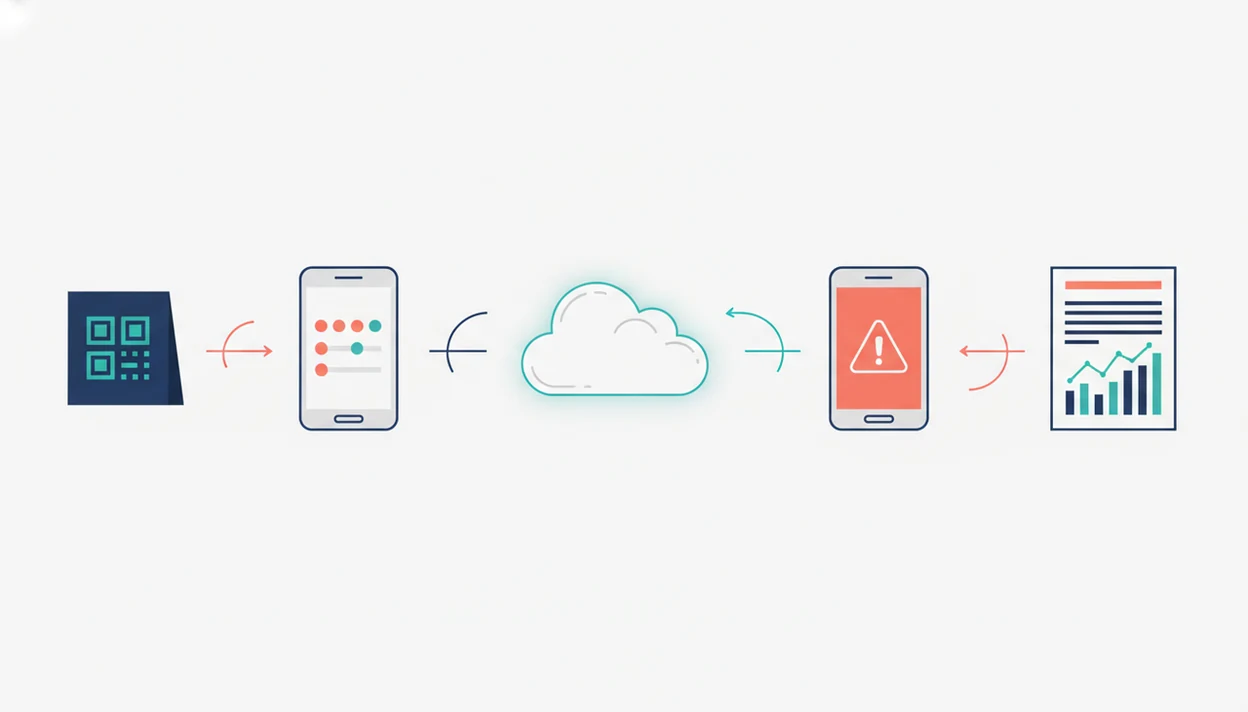
A restaurant feedback survey app works by turning a guest action into structured operational data. The guest scans a QR code, lands on a mobile-optimized survey, and submits a score without installing anything.
From there, response data flows into a central dashboard tagged by location, shift, time, server, or menu item. Sentiment thresholds can trigger SMS or email alerts when a diner gives a low score or writes a concerning comment. NPS and star scores then aggregate into weekly trend lines managers review before the next schedule is posted.
Open-ended comments are often grouped into categories like food, service, wait time, and ambiance. That matters because a one-star public review and a private comment are different moments. One is damage control. The other can still be recovered.
QR responses are self-selected, however, so they are not random samples. Treat them as operating signals, not academic research.
How to Set Up a Restaurant Feedback App With QR Surveys
To set up a restaurant feedback app, keep the first workflow small enough for staff to use during a normal shift. The goal is not a research project. It is a repeatable response window.
- Choose an app and create a short survey with 3 to 5 questions, including a star rating, NPS, and one open comment.
- Generate QR codes and place them on receipts, table tents, or check presenters.
- Set alert thresholds so low scores route instantly to the on-duty manager.
- Train staff on recovery protocol before the first alert fires.
- Review weekly trend reports by shift and server each Monday.
- Adjust survey questions quarterly when repeated patterns appear.
On days the slow line beside the card reader keeps showing up in comments, Customer Feedback Surveys earns its spot because managers can connect that issue to time, shift, and score history.
If you need starting language beyond restaurants, use broader customer feedback survey templates and trim them down.
Restaurant Feedback App Drawbacks for Small Businesses
Restaurant feedback apps are useful, but they can create false confidence if managers overread the data. QR surveys attract self-selected respondents, so they do not represent every diner equally.
High star ratings can also mask repeated problems. A restaurant might average 4.6 stars while open comments mention slow drink refills every Friday night. That is exactly why managers should read comments, not just scores.
Real-time alerts are only useful when staff know what to do next. If a host sees a low-score alert but cannot comp a dessert, move a table, or call a manager, the workflow stalls.
Low response volume is another issue. Ten responses in a week can show useful stories, but it is weak evidence for judging a server. Some apps also lock alerts, exports, or advanced reports behind higher pricing tiers, including broader tools like surveymonkey.com, typeform.com, qualtrics.com, google.com/forms, and jotform.com.
Limitations
Restaurant feedback software helps managers see problems sooner, but it does not replace direct supervision or staff training. Use it as an operating habit, not a cure-all.
- QR code surveys produce self-selected responses, not statistically representative samples.
- Feedback apps reveal problems but do not fix staffing, food quality, or training on their own.
- Real-time alerts only help if front-of-house staff are trained to act quickly.
- Weekly trend tracking can mislead when response volume is low or inconsistent.
- NPS and star ratings are useful signals, but they do not fully explain loyalty or root causes.
- Apps cannot prevent guests from posting negative public reviews, even after internal recovery.
- Survey fatigue can reduce completion rates if questions are not refreshed over time.
For small restaurants, Customer Feedback Surveys is often easier than enterprise guest feedback software because the workflow centers on QR collection, alert thresholds, and a weekly review habit.