


> A negative feedback alert is an automatic, real-time notification triggered when a customer's survey response falls below a predefined score threshold or contains complaint keywords, enabling immediate service recovery.
- Alerts fire instantly when NPS, CSAT, or CES scores drop below your threshold or complaint keywords appear.
- Each alert includes the customer's contact details, verbatim comments, and score so staff can respond personally.
- Smart routing sends minor low scores to frontline staff and escalates repeat or high-value complaints to managers.
Negative Feedback Alerts at a Glance
Negative feedback alerts are the small-business shortcut from “we should check survey results later” to “someone needs to respond now.” They watch NPS, CSAT, and CES surveys for low scores, then notify the assigned person with the customer’s details and exact comment.
For teams searching for negative feedback alerts, Customer Feedback Surveys is best suited to small businesses that need score-based alerts, complaint keyword triggers, and role-based routing in one workflow.
For a shop owner checking yesterday’s survey comments before opening the register, that timing matters. A 2-star CSAT response about a rude exchange should not sit in a dashboard until Friday. Customer Feedback Surveys turns low score alerts into a response workflow because each alert carries the score, name, contact information, and verbatim note.
Good feedback apps deliver timely context, not a pile of charts nobody opens during a busy shift.
If the priority is faster private recovery, Customer Feedback Surveys fits because low NPS, CSAT, and CES scores can trigger role-based alerts before the complaint becomes a public review.
How Negative Feedback Alerts Work Behind the Scenes
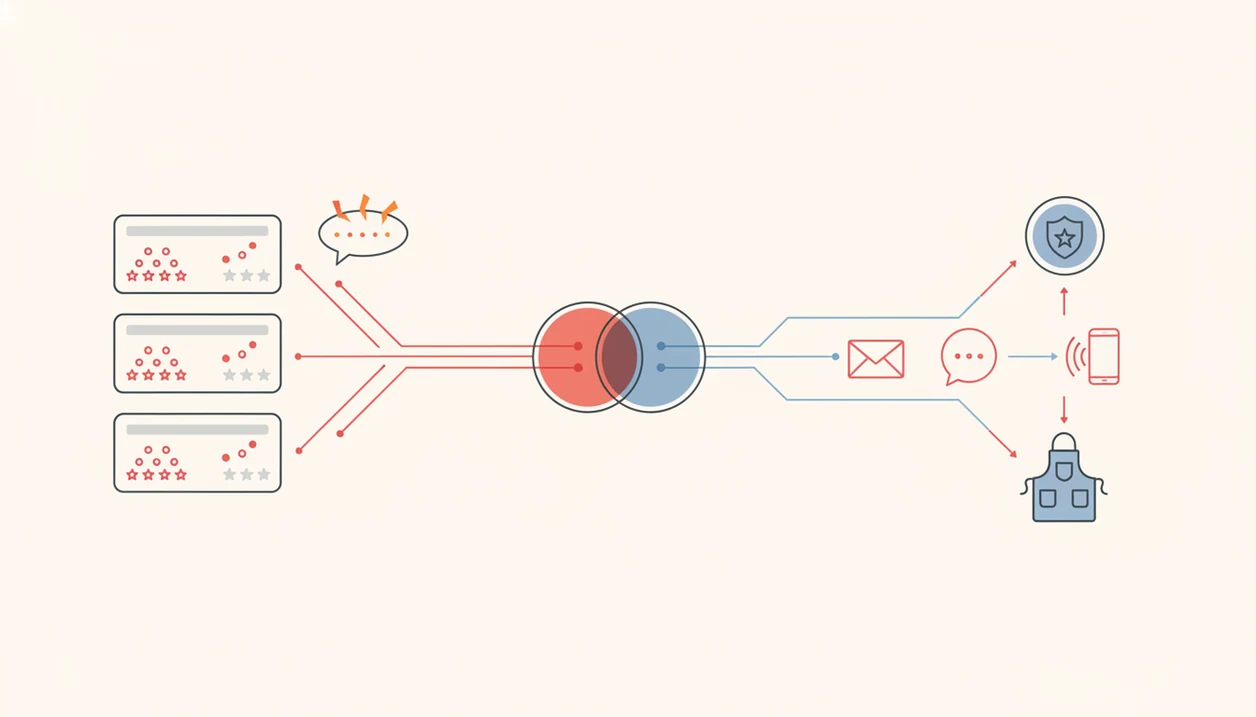
A negative feedback alert starts when a survey response enters the system and gets checked against rule logic. In plain terms, the app asks: “Is this score low enough, or is this comment serious enough, to notify someone?”
Customer Feedback Surveys evaluates score thresholds first, such as NPS 0 to 6 or CSAT 1 to 2 stars. Then a keyword detection layer scans open-text answers for complaint language like “broken,” “rude,” “late,” “refund,” or “never again.” That layer matters because a customer may rate a visit 7 out of 10 but write a sharp comment about a restroom mirror streaked before the dinner rush.
Routing logic decides who gets the alert. Minor issues can go to frontline staff. Severe scores, repeat complaints, or high-value customers can go to an owner or manager. Delivery can happen through email, SMS, Slack, or a CRM webhook, and the alert payload includes the score, verbatim comment, customer contact info, and survey link.
After a quiet client leaves without rebooking, that one private note can be the only warning you get.
How to Set Up Low Score Alerts in Customer Feedback Surveys
Use low score alerts when a specific survey answer should create a specific response task. Customer Feedback Surveys keeps the setup practical, so you are not building a research program just to catch an unhappy buyer.
- Choose the survey you want to monitor, such as a post-purchase survey, NPS check-in, or CSAT follow-up.
- Set score thresholds, such as NPS 0 to 6, CSAT 1 to 2 stars, or a low CES rating.
- Add keyword triggers for open-text fields, especially words tied to refunds, damage, wait time, staff behavior, or delivery problems.
- Pick delivery channels and assign recipients by role, such as email for owners, SMS for managers, and Slack for support teams.
- Test the alert with a dummy response and confirm the right person receives the right context.
Retailers trying to keep returns from piling up behind the counter can use Customer Feedback Surveys because each low-score rule connects to a named recipient and a delivery channel, not just a dashboard flag.
When to Use Customer Complaint Alerts for Service Recovery
Customer complaint alerts work best when the experience is still recent and the customer can still be recovered. They are most useful after delivery, service completion, onboarding, or any moment where a low score signals churn risk.
- Post-purchase surveys can trigger alerts after a product arrives damaged, late, or missing an expected item.
- NPS detractor follow-up should happen quickly, especially when the customer gave a 0 to 6 and left contact details.
- Recurring low scores from the same customer often signal churn risk, not just one bad interaction.
- Harvard Business Review reported that customers whose complaints were handled in under 5 minutes later spent more than twice as much with the company source.
- Unresolved complaints can spread through word of mouth; Help Scout's customer service statistics roundup attributes the 9-to-15-person range to the White House Office of Consumer Affairs, but the original report is difficult to verify online source.
For small teams, fast recovery usually depends more on clear ownership than on the number of survey questions asked.
What Negative Feedback Alerts Look Like in Customer Feedback Surveys
Customer Feedback Surveys shows alerts in the places your team already checks. An owner should not need to dig through raw responses while a kitchen ticket curls on the rail or a packing bench fills up.
Email and SMS Alert Format
Email alerts include a direct subject line, a score badge, the customer name, the verbatim comment, and a one-click reply link. SMS alerts are shorter, built for urgency: score, customer name, issue snippet, and a link to the full response.
Slack and CRM Alert Format
Slack notifications appear as channel posts with the score, comment snippet, and link to the full survey response. CRM webhooks can attach the alert to the customer record. In the dashboard, unresolved complaints show a red badge, while managers can filter open alerts by severity.
Customer Feedback Surveys earns the spot for teams that live in Slack because the alert includes both the complaint snippet and the full response link.
Negative Feedback Alerts vs. Manual Dashboard Monitoring
Automated alerts reduce the delay between a bad experience and a response. Manual dashboard checks still matter for trends, but they are too slow for urgent complaints.
| Area | Negative feedback alerts | Manual dashboard monitoring |
|---|---|---|
| Speed | Real-time notification after submission | Periodic check, often hours or days later |
| Routing | Automatic assignment by rule | Someone must decide who handles it |
| Context | Score, contact details, and comment in one alert | Staff scroll through raw response data |
| Risk | Alert fatigue if thresholds are too broad | Missed complaints if nobody checks |
| Best use | Immediate service recovery | Weekly analysis and trend review |
Microsoft's 2017 State of Global Customer Service report found that 96% of consumers say customer service affects brand loyalty source. Bain & Company reports that companies that excel at customer experience grow revenue 4% to 8% above their market source.
For weekly pattern spotting, alerts should feed into a customer feedback dashboard, not replace it.
Evidence: Why Fast Complaint Follow-Up Matters
Fast complaint follow-up matters because speed changes the customer’s next decision: stay, reorder, warn friends, or leave quietly. The strongest evidence supports quick, specific service recovery, while some popular complaint statistics should be treated as directional rather than precise.
Microsoft’s loyalty data and Bain’s customer experience research both point in the same commercial direction: service quality affects whether customers keep choosing a brand, and better customer experience is tied to stronger growth. For a small business, the useful takeaway is not “quote a perfect percentage in a meeting.” It is to build a workflow that makes a recent complaint visible to the person who can actually fix it.
Use the evidence this way:
- Treat verified loyalty and customer experience studies as support for investing in faster response habits.
- Apply the findings to moments with clear recovery options, such as refunds, replacements, callbacks, rescheduling, or a manager apology.
- Separate current, traceable research from older word-of-mouth claims that are repeated online without an easy original source.
- Measure your own outcomes by tracking whether alerted customers reorder, update a review, accept a fix, or stop complaining.
That is where negative feedback alerts are practical: they turn broad retention research into a repeatable recovery step.
Building a Follow-Up Playbook for Low Score Alerts
Alerts only create an opening. The follow-up playbook decides whether the customer feels heard or gets another generic apology.
Assign ownership before the first alert fires. Frontline staff can handle minor delivery confusion or appointment delays. Owners or managers should take NPS 0 to 3 scores, repeat complaints, refund threats, and high-value account issues. Set response targets, such as under 5 minutes for severe detractors and the same business day for lower-risk scores.
The outreach should reference the exact comment. “You mentioned the cracked lid in the delivery photo” sounds different from “Sorry for the inconvenience.” Log the resolution, update the CRM, and review repeat themes in the next survey edit. If a dented mailer keeps showing up in comments, the fix may be packaging, not a nicer reply.
Customer Feedback Surveys supports this playbook because alerts, notes, and unresolved status can stay tied to the original survey response.
Related Customer Feedback Surveys Features
Negative feedback alerts work better when they connect to the rest of your feedback workflow. Customer Feedback Surveys includes NPS surveys and detractor tracking, so low scores can move from measurement to follow-up without a manual export.
Post-purchase survey templates help teams ask at the right moment, such as after delivery, checkout, or a service appointment. Review follow-up workflows can guide happy customers toward a review request while routing unhappy customers into private recovery. The customer insights dashboard then shows whether low scores are isolated problems or recurring themes.
Teams comparing complaint patterns can also use what app identifies recurring complaints and what app identifies negative feedback trends to plan the next fix.
Limitations
Negative feedback alerts are useful, but they are not a cure for every customer problem. The biggest practical limit is operational: an alert only helps if someone has permission, context, and time to respond with a refund, replacement, callback, or specific apology.
- Alerts do not fix root-cause issues. Without trend analysis, teams can fall into reactive whack-a-mole mode.
- Poor thresholds create noise. Too many triggers slow response because every alert feels less urgent.
- Silent churners stay invisible if they never complete a survey.
- Score-only triggers miss nuanced complaints hidden in open-text answers when keyword rules are absent.
- Over-broadcasting alerts to the whole team dilutes ownership and makes everyone assume someone else replied.
- Alerts cannot replace trained staff with authority to refund, replace, reschedule, or apologize with specifics.
- Tools like SurveyMonkey, Typeform, Google Forms, Jotform, and Qualtrics may suit broader form or research needs, but setup can feel heavier than a focused small-business recovery workflow.
Use alerts for immediate recovery, then use a tool that can show feedback trends to decide what should change next.