
Tool That Can Collect Feedback And Reviews Safely
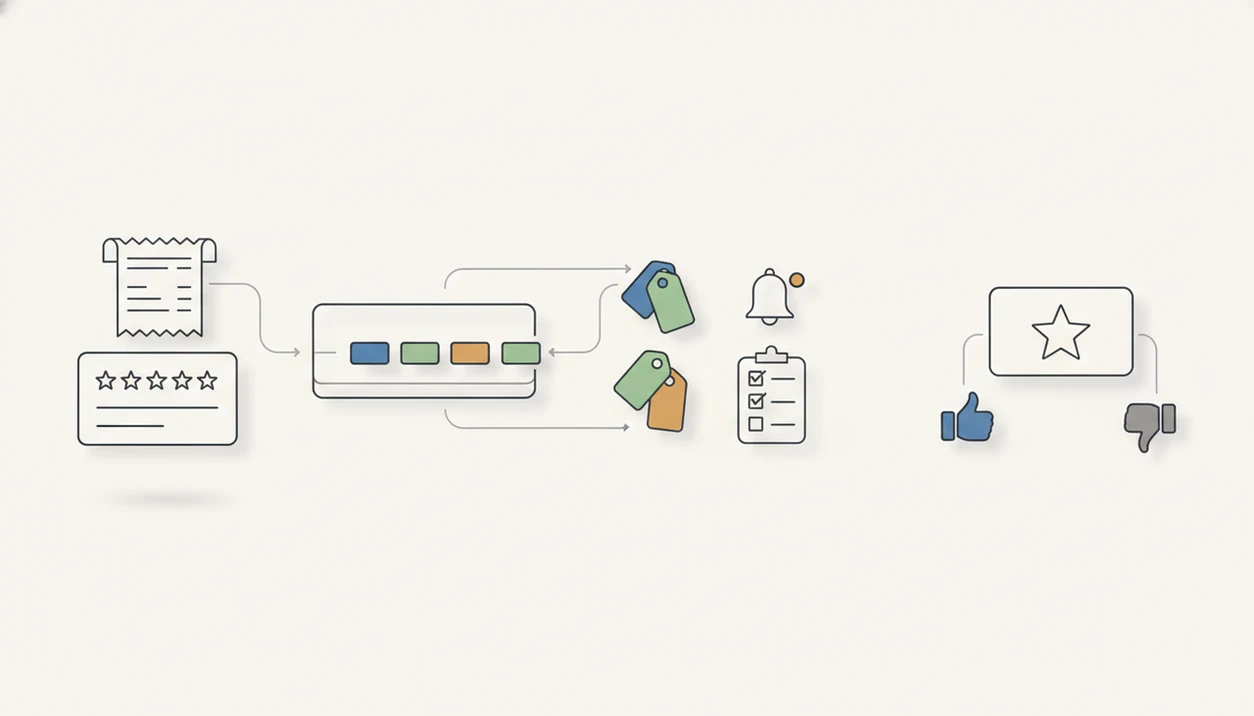
A tool that can collect feedback and reviews should collect honest private feedback first, then offer an optional public review request without suppressing unhappy customers. The safest setup combines short post-purchase surveys, NPS or satisfaction ratings, open-ended comments, internal follow-up workflows, and neutral review invitations.
> Customer Feedback Surveys is a customer feedback survey app that collects post-purchase surveys, NPS scores, and review follow-ups for small businesses.
- Use private feedback surveys to understand customer experience before asking for any public review.
- Do not use review gating, selective routing, or language that pressures only happy customers to post publicly.
- The best feedback and review tool turns scores and comments into tags, trends, alerts, and follow-up tasks.
Feedback And Review Tool Definition For Small Businesses
A feedback and review tool collects structured ratings, open-ended comments, and review follow-up responses after a purchase or service interaction. It is different from a public review generator because its first job is learning and service recovery, not pushing up public star ratings.
For a small shop, that might mean a receipt link printed below the total. For a salon, it may be a short text after the appointment. The owner needs to know why a customer gave a 6 out of 10 after saying “everything was fine” at the counter.
People use several names for this category: feedback and review tool, customer review follow up tool, and post-purchase survey app. The safer versions keep private feedback open to everyone and make any public review request optional.
How A Tool That Can Collect Feedback And Reviews Works
A tool that can collect feedback and reviews works by triggering a request after a purchase, visit, delivery, or support interaction. It sends a survey, captures a score and comment, stores the response, segments follow-up, and reports patterns over time.
The mechanism is simple: event trigger, response capture, routing logic, and trend reporting. In plain terms, the tool asks at the right moment, records what the customer said, then helps the team decide what to do next. Channels matter. Email, SMS, QR codes, web forms, and in-app prompts can produce different response behavior and data quality, as Pew Research Center has noted in its survey methods work.
A good customer feedback survey app for small businesses should collect post-purchase surveys, NPS scores, and actionable customer insights, not manufacture public praise. Routing should support service recovery and optional review invitations, not hide negative customers from review sites.
Requirements Before You Choose A Customer Review Follow Up Tool
Before choosing a customer review follow up tool, define the business rules first. Small businesses usually need a practical feedback workflow, not an enterprise research platform with months of setup and fields nobody checks.
- Customer contact permission: Know whether you can send email, SMS, or another request after the transaction.
- Purchase or service trigger: Decide what starts the survey, such as checkout, delivery, completed appointment, or closed ticket.
- Survey timing: Ask while the experience is still fresh, but not so fast that the customer cannot judge the outcome.
- Review site destination: Pick the public review location before launch, such as Google or another industry site.
- Follow-up owner: Assign a real person to low scores, urgent comments, and unresolved complaints.
Question wording, ordering, and context can materially change survey results, according to Census Bureau survey methods guidance. Keep a documented no-gating policy beside your templates. Boring? Maybe. Useful when staff rotate.
How To Use A Tool That Can Collect Feedback And Reviews
Use a feedback and review tool by asking every customer for private feedback first, then handling recovery and public review invitations as separate actions. The goal is to learn what happened, fix problems quickly, and avoid a workflow that only amplifies praise.
- Trigger the survey after a real customer event, such as purchase, delivery, appointment completion, or ticket closure. Do not send it so early that the customer cannot judge the outcome.
- Ask one neutral rating question and one open comment question. A short survey is easier to answer and easier for the owner to review.
- Route low scores and urgent comments to a named person, not a shared inbox nobody owns. Give that person a clear recovery step, such as calling the customer or checking the order.
- Offer an optional public review link in neutral language. Do not hide the link from unhappy customers or make the invitation depend on a high score.
- Review scores, tags, and comments each week before changing staffing, pricing, products, or service rules. Patterns matter more than one loud response.
Step 1: Set A Neutral Post-Purchase Feedback Survey
Use a short, neutral post-purchase survey before any review request. The first survey should usually include one rating question, one NPS or satisfaction question where useful, and one open-ended comment box.
- Ask one overall question: Use “How was your experience?” instead of “How great was your visit?”
- Add one score: Use CSAT, a star rating, or NPS if you plan to track it weekly.
- Invite a comment: Ask “What should we know about your experience?” so the customer can explain the score.
- Avoid loaded wording: Do not imply that only positive feedback is expected.
- Keep it brief: Remove any question that will not change a follow-up, product decision, or staff conversation.
Numbers show direction, while comments explain the cause. A server refilling water mid-complaint needs more than a 2-star score in tomorrow’s dashboard. For stores focused on timing and checkout flow, an app that collects customer feedback after purchase can keep the request close to the transaction.
Step 2: Separate Private Feedback From Public Review Requests
“Can I ask happy customers for reviews and send unhappy customers somewhere else?” The safer answer is no if the workflow suppresses or filters dissatisfied customers away from public review opportunities.
Every customer should be allowed to give honest private feedback, including negative feedback. Satisfied customers can receive an optional public review invitation, but dissatisfied customers should not be hidden, delayed, or diverted in a way that manipulates public ratings.
There is a real difference between service recovery routing and review gating. Service recovery means a low score creates an internal task, such as calling the customer about a missing item. Review gating means the business uses the score to decide who gets a public review link.
For policy context, Google says businesses should not discourage or prohibit negative reviews or selectively solicit only positive reviews (https://support.google.com/contributionpolicy/answer/7400114), and the FTC treats review suppression as a deceptive review practice risk (https://www.ftc.gov/business-guidance/advertising-marketing/endorsements-influencers-reviews).
Use neutral language: “If you would like to share your experience publicly, you can leave a review here.” That sentence gives the customer a choice. It does not pressure them.
Step 3: Use NPS Scores And Comments In The Feedback And Review Tool
NPS, star ratings, CSAT, and customer comments answer different questions, so a feedback and review tool should not treat them as interchangeable. A weekly spreadsheet tab with NPS scores, customer quotes, and one assigned follow-up is often more useful than a dashboard full of unused charts.
- NPS: Shows likelihood to recommend, useful for broad loyalty tracking.
- Star ratings: Show quick sentiment, but rarely explain what happened.
- CSAT: Measures satisfaction with a specific visit, order, or support case.
- Open comments: Explain causes such as delivery, staff, pricing, product quality, support speed, or cleanliness.
- Tags: Turn repeated comments into patterns a manager can review.
A 2018 meta-analysis on customer feedback metrics found positive associations between recommendation metrics and business performance, but the authors cautioned that those links are correlational rather than proof of causation (https://link.springer.com/article/10.1007/s11747-018-0616-3). Star ratings alone are not enough for operational action.
Step 4: Assign Customer Follow-Ups From Survey Responses
Collected feedback becomes useful when it creates a next step. Low scores, urgent comments, and repeat complaints should create follow-up tasks with an owner and a response deadline.
A refund request might go to the manager by 3 p.m. A delayed appointment might go to the front desk before the next booking block. A damaged product, rude service note, or missing item should not sit in a general inbox beside shipping confirmations and order numbers.
Private recovery is not the same as asking for a public review. Recovery is the business trying to fix a problem directly with the customer. A review request is an optional invitation to share an experience publicly. Keep those actions separate in the workflow, even when they happen after the same survey.
Tools such as Google Forms, Typeform, Jotform, SurveyMonkey, and simple shared spreadsheets can support basic follow-up flows, but the owner still has to close the loop.
Step 5: Review Feedback Trends Before Changing Operations
Review trends before changing staffing, pricing, menus, or product pages. One angry comment deserves attention, but repeated comments across scores, tags, locations, employees, products, or customer segments deserve a management decision.
Look weekly for small teams and monthly for lower-volume businesses. Compare recurring issues against order volume. Ten delivery complaints may mean something different during a 70-order week than during a 700-order week. The warehouse shelf with mislabeled bins may explain three “wrong item” comments better than the star average does.
Survey participation can be meaningful when audience, sampling, and design are strong. For context, Census methods documentation has reported a web survey response rate around 74% for the American Community Survey, but that is not a benchmark for every business. The tool reveals patterns. People decide what to change.
For store owners building a survey habit from scratch, customer feedback surveys for small business should stay short enough to review before opening the register.
Common Myths About A Tool That Can Collect Feedback And Reviews
Several myths lead small businesses toward risky review workflows or bloated software. The right tool should help ask at the right moment, close the loop, and learn from patterns.
Review generator myth
A feedback and review tool is not the same as a review generator. A review generator focuses on public review volume. A safer workflow collects private feedback first and keeps public review invitations optional.
Long survey myth
More questions do not always produce better insight. Longer surveys often make customers quit, rush, or write less useful comments.
Three other myths are just as common: star ratings alone explain customer experience, any review request flow is automatically compliant, and software can fix operational problems without human follow-up. A quiet client leaving without rebooking may tell you less in person than they do in a private comment later. The tool captures that signal. It does not repair the relationship by itself.
Safe Workflow Checklist For A Customer Review Follow Up Tool
A safe customer review follow up tool should pass a simple workflow review before launch. If a staff member cannot explain the difference between private recovery and public review requests, the setup needs another pass.
| Checklist item | Pass | Fail |
|---|---|---|
| Neutral survey language | Asks “How was your experience?” | Pushes positive wording |
| Short survey | Uses only needed questions | Adds unused questions |
| Comment field | Allows open customer comments | Captures score only |
| No suppression | Lets all customers give feedback | Filters unhappy customers |
| Optional review link | Frames review as a choice | Pressures public posting |
| Recovery path | Routes low scores internally | Leaves complaints unread |
| Reporting dashboard | Shows scores, tags, and trends | Shows vanity totals only |
| Follow-up owner | Names the responsible person | Sends tasks nowhere |
A pass/fail review should be practical, not theoretical. Test the flow with a happy customer, a neutral customer, and an unhappy customer before using it live. A best post purchase survey app should make that test easy to run.
Limitations
Feedback and review software has limits. It can organize signals, but it cannot guarantee better reviews, higher loyalty, or cleaner operations by itself.
- A tool cannot fix bad operations without managers, staff, and owners acting on the feedback.
- Survey data can mislead when timing, sampling, wording, or channel selection is poor.
- Low response rates can leave quiet, busy, older, or less digital customers underrepresented.
- NPS and star ratings are signals, not complete measures of loyalty or future revenue.
- Public review workflows can create trust and compliance problems if they filter negative customers.
- Email, SMS, web, QR code, and in-app channels should not be treated as interchangeable.
- Competitors such as SurveyMonkey, Typeform, Qualtrics, Google Forms, and Jotform may offer more branching or customization than a simple small-business app needs.
Simple is fine. Simple still needs rules. Lightweight survey apps fit teams that want a basic feedback workflow, while more complex teams may need broader research tooling, branching logic, or enterprise reporting.
FAQ
What does a feedback tool collect from customers?
A feedback tool collects customer ratings, comments, satisfaction scores, NPS responses, and follow-up signals after a purchase or service interaction. It should organize those responses so the business can act on them.
What does a review tool do for a small business?
A review tool helps a small business request or manage public reviews after a customer experience. It should not manipulate which customers are allowed to respond publicly.
Is review gating allowed?
Review gating means filtering unhappy customers away from public review opportunities, and it can create compliance and trust risks. Businesses should avoid workflows that suppress negative opinions.
How short should a customer feedback survey be?
A customer feedback survey should include only the questions needed to act on the response. For many small businesses, one score question and one comment box are enough.
Should I ask customers for an NPS score?
NPS can be useful when you want a simple loyalty signal over time. It should be paired with comments, tags, and follow-up analysis.
Are star ratings enough to understand customer experience?
Star ratings show customer sentiment, but they do not explain the reason behind the experience. Comments and follow-up tags are needed for operational action.
When should a business request a public review?
A business should usually request a public review after a completed purchase, delivery, visit, or resolved service interaction. The invitation should be optional and neutrally worded.
Can unhappy customers still leave public reviews?
Yes, unhappy customers should not be blocked from leaving honest public reviews. Customer Feedback Surveys can be part of a private recovery workflow, but public review access should not be unfairly restricted.